> ## Documentation Index
> Fetch the complete documentation index at: https://docs.ale.run/llms.txt
> Use this file to discover all available pages before exploring further.
# Dockerfile
> You can easily deploy your Dockerfile using the `ale` Dockerfile template.
`ale` presets and templates use minimal libraries to optimize resource usage.
If your application requires additional libraries not included in our default presets, such as Windows or Chrome libraries, you need to use the Dockerfile template. Please refer to our [example code](/en/developers/dockerfile#example-code-by-language) for creating your custom Dockerfile.
***
## Select Template and Repository
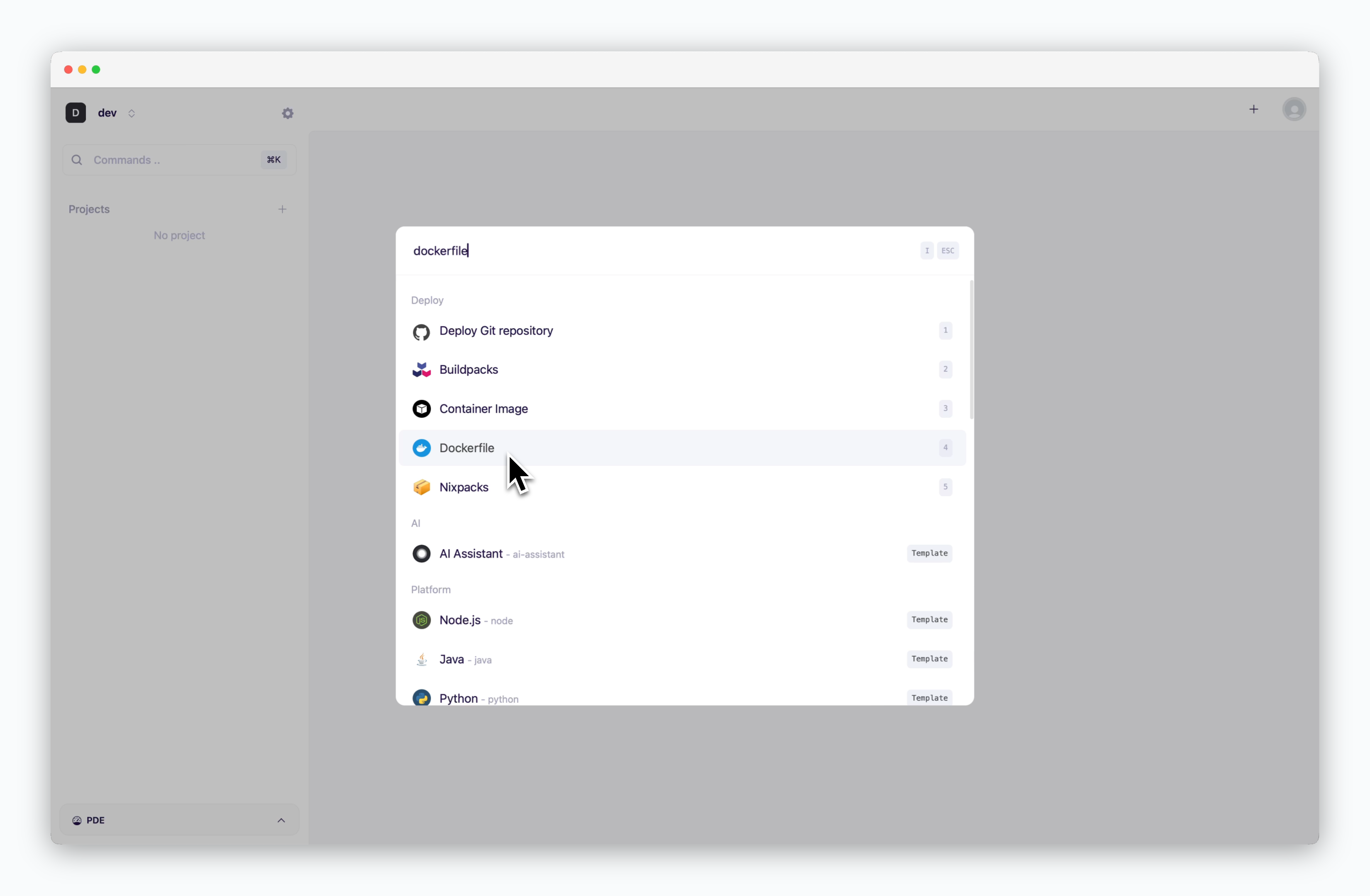 > On the dashboard, click or `⌘ + K` to open the deployment modal. Select the **Dockerfile template**, Then choose a GitHub repository from the dropdown or [input a Git repository URL in the Git URL tab](/en/developers/private-repo).
## Configuration and Deployment
### Basic Settings
> On the dashboard, click or `⌘ + K` to open the deployment modal. Select the **Dockerfile template**, Then choose a GitHub repository from the dropdown or [input a Git repository URL in the Git URL tab](/en/developers/private-repo).
## Configuration and Deployment
### Basic Settings
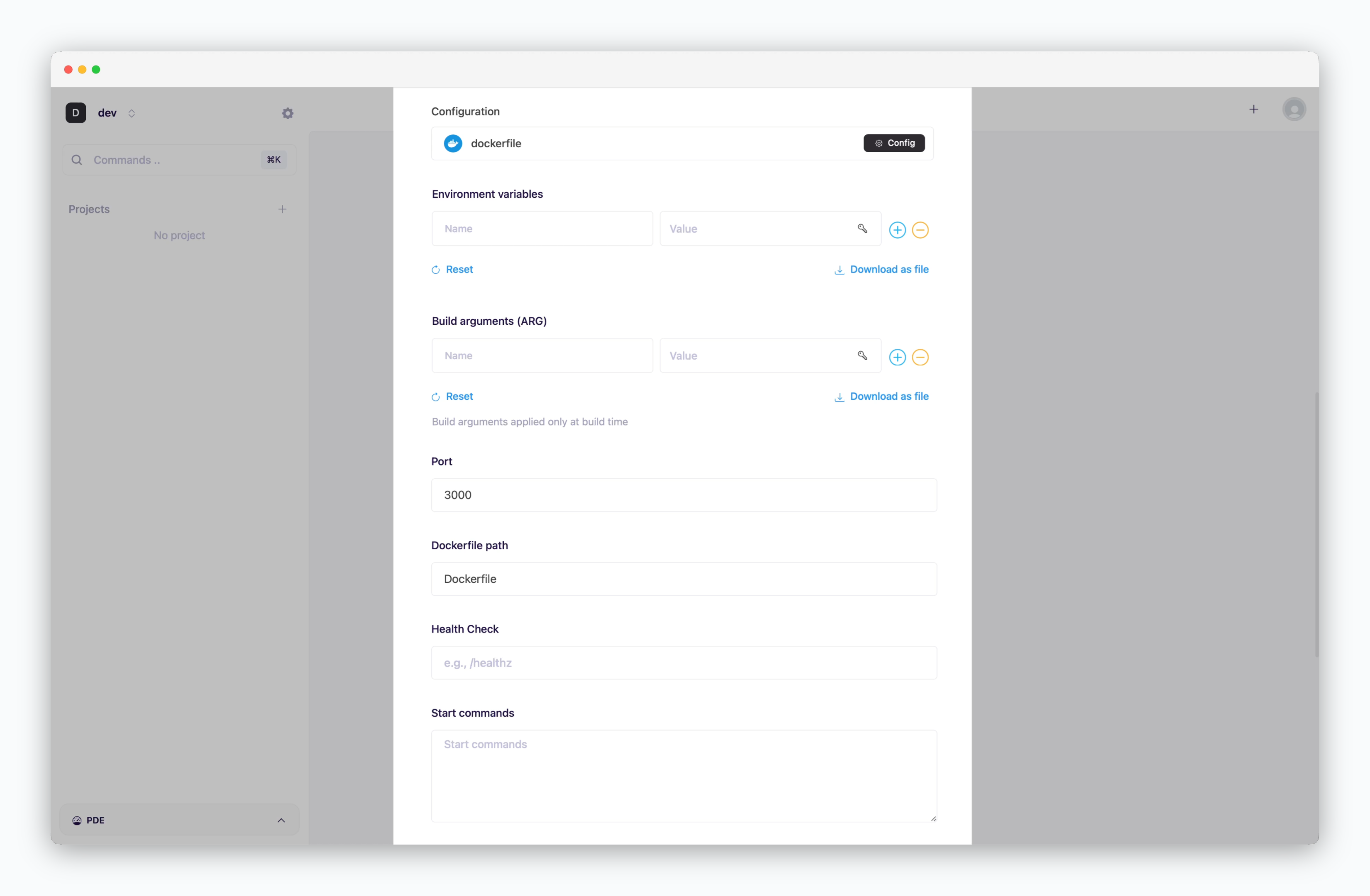 * **Environment variables(ENV)**: Environment variables passed to containers at runtime
* **Build arguments(ARG)**: Build-time variables used during Docker image construction
* **Port**: Container port mapping configuration (corresponds to Docker's -p or --publish flag)
* **Health Check**: endpoint used to verify container health status
* **Start commands**: Commands executed when the container starts
### More Options
* **Environment variables(ENV)**: Environment variables passed to containers at runtime
* **Build arguments(ARG)**: Build-time variables used during Docker image construction
* **Port**: Container port mapping configuration (corresponds to Docker's -p or --publish flag)
* **Health Check**: endpoint used to verify container health status
* **Start commands**: Commands executed when the container starts
### More Options
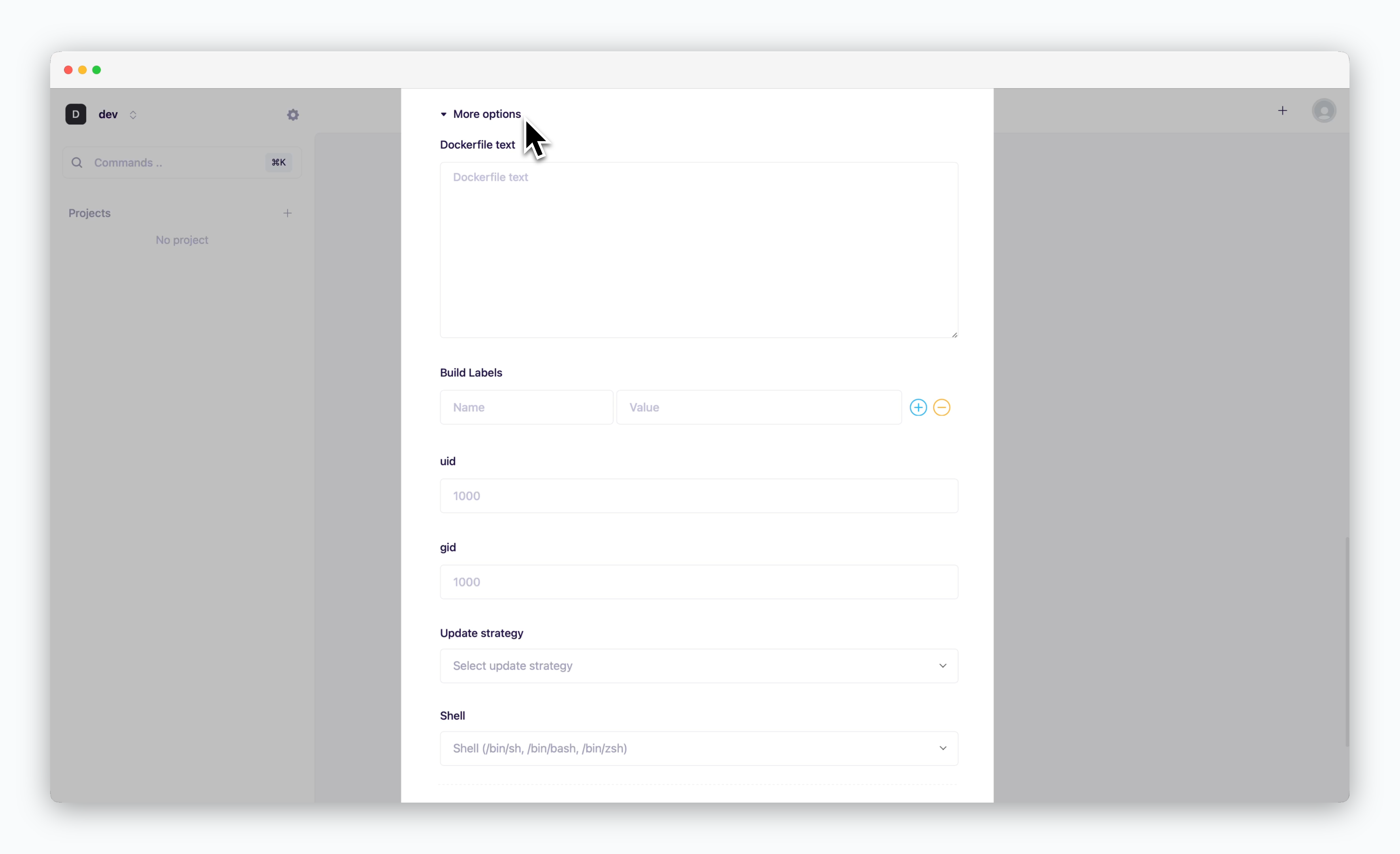 * **Dockerfile text**: Enter the complete contents of the Dockerfile
* **Build Labels(LABEL)**: Custom metadata for your Docker image (e.g., version, description)
* **uid**: User ID for executing processes within the container (default: 1000)
* **gid**: Group ID for process ownership within the container (default: 1000)
* **Update strategy**
* **Rolling Update**: Deploy new version incrementally while maintaining service availability. Requires sufficient node resources
* **Recreate**: Stop all instances before deploying new version. Results in service downtime
* **Shell**: Specify the shell for container runtime execution (sh, bash, zsh, etc.)
### Resource and Deployment
* **Dockerfile text**: Enter the complete contents of the Dockerfile
* **Build Labels(LABEL)**: Custom metadata for your Docker image (e.g., version, description)
* **uid**: User ID for executing processes within the container (default: 1000)
* **gid**: Group ID for process ownership within the container (default: 1000)
* **Update strategy**
* **Rolling Update**: Deploy new version incrementally while maintaining service availability. Requires sufficient node resources
* **Recreate**: Stop all instances before deploying new version. Results in service downtime
* **Shell**: Specify the shell for container runtime execution (sh, bash, zsh, etc.)
### Resource and Deployment
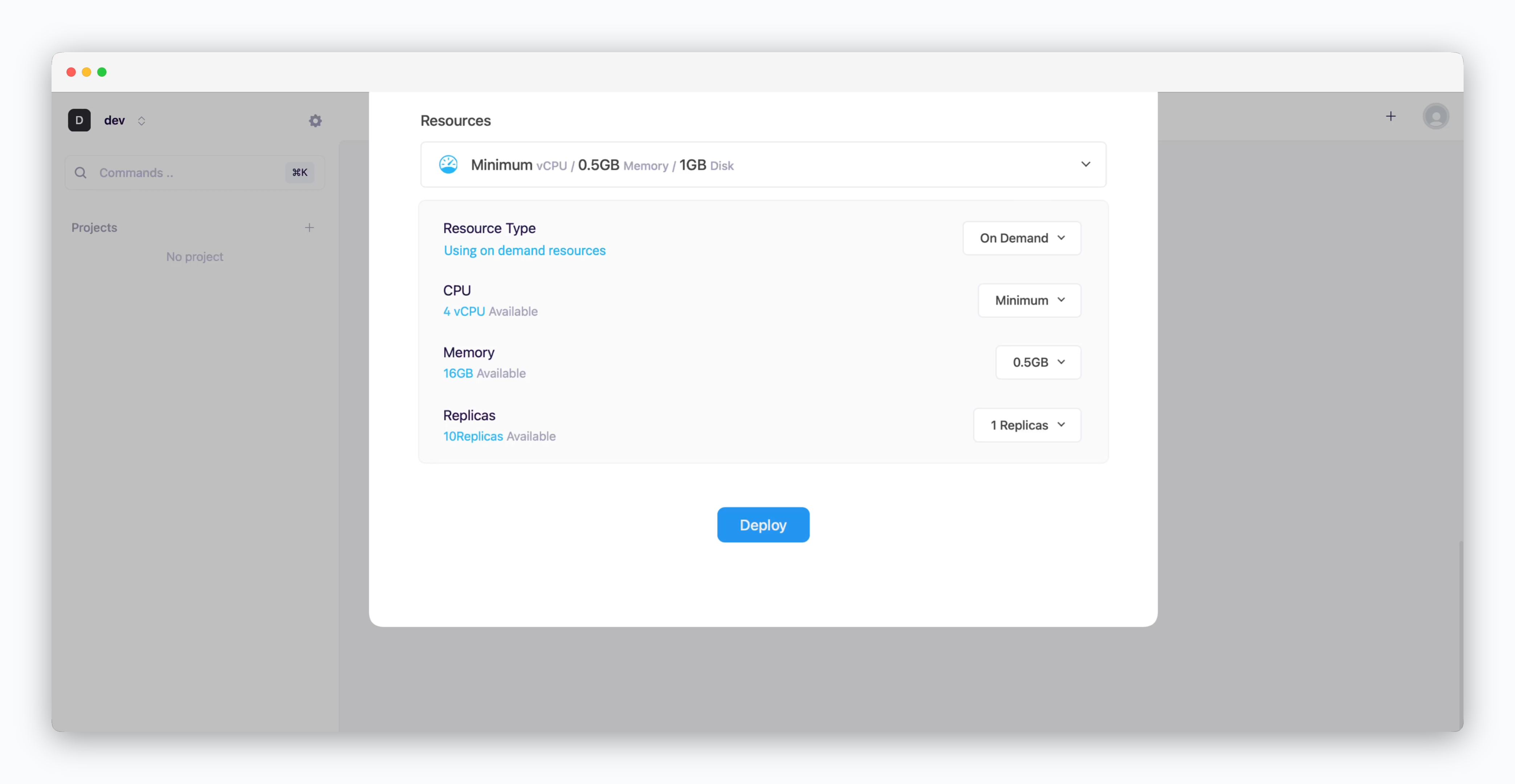 * **Resource Type**: Select between [On-demand or Spot instance types](/en/developers/resource#on-demand-spot)
* **CPU**: Maximum vCPU resource for the service. Minimum vCPU means 0.1 vCPU
* **Memory**: Maximum memory size your service can use
* [Replica](/en/developers/replica): Number of service replicas for high availability and load balancing
* **Deploy**: Click `Deploy`
If deployment fails due to resource limitations, see [the Space and Resource Management page](/en/operations/spaces#allocate-resources) to add resources to your space.
## Logs & Terminal
* **Resource Type**: Select between [On-demand or Spot instance types](/en/developers/resource#on-demand-spot)
* **CPU**: Maximum vCPU resource for the service. Minimum vCPU means 0.1 vCPU
* **Memory**: Maximum memory size your service can use
* [Replica](/en/developers/replica): Number of service replicas for high availability and load balancing
* **Deploy**: Click `Deploy`
If deployment fails due to resource limitations, see [the Space and Resource Management page](/en/operations/spaces#allocate-resources) to add resources to your space.
## Logs & Terminal
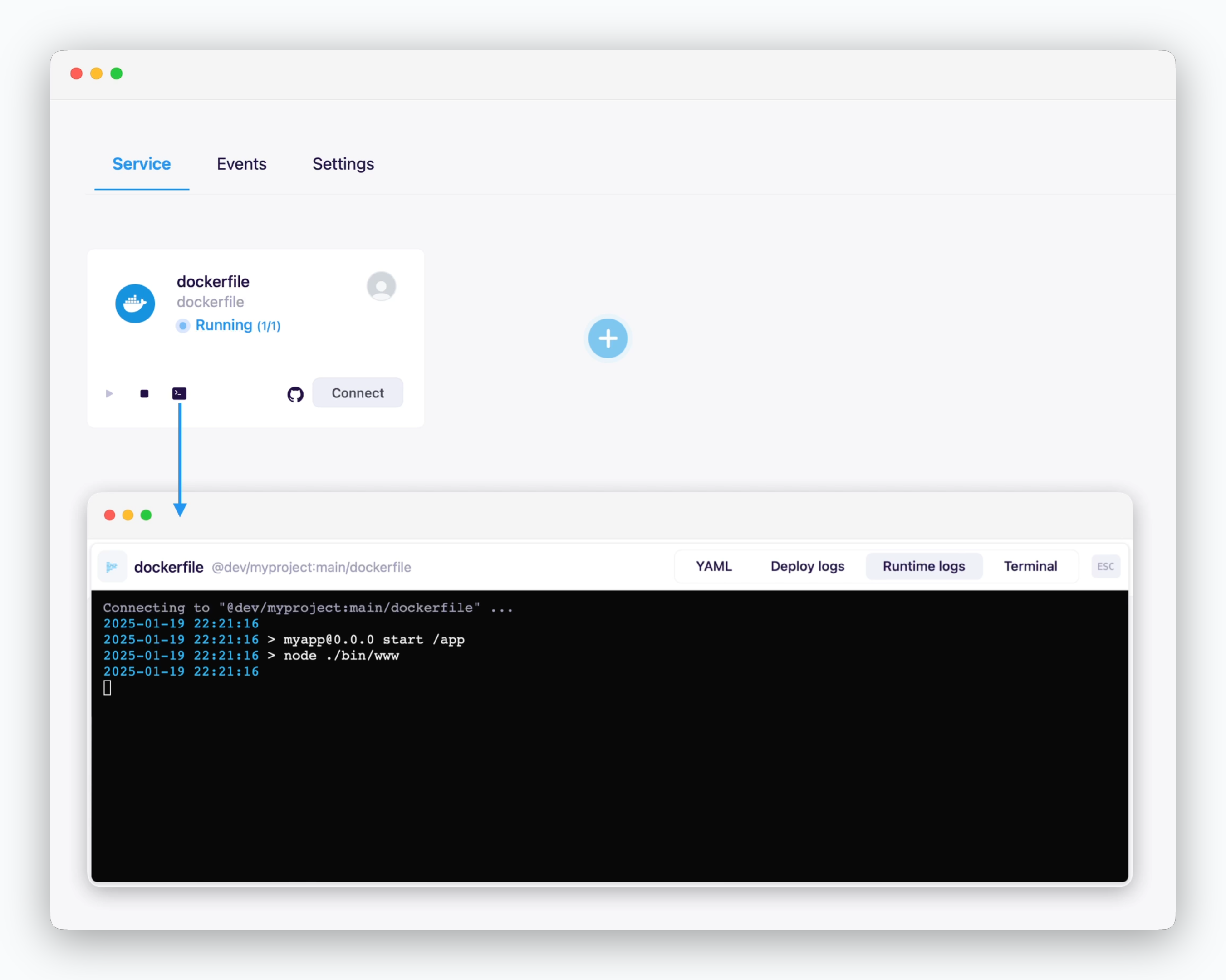 > Click the ** icon** in the service card or service page to check deployment/runtime logs or access the terminal.
## Metrics
> Click the ** icon** in the service card or service page to check deployment/runtime logs or access the terminal.
## Metrics
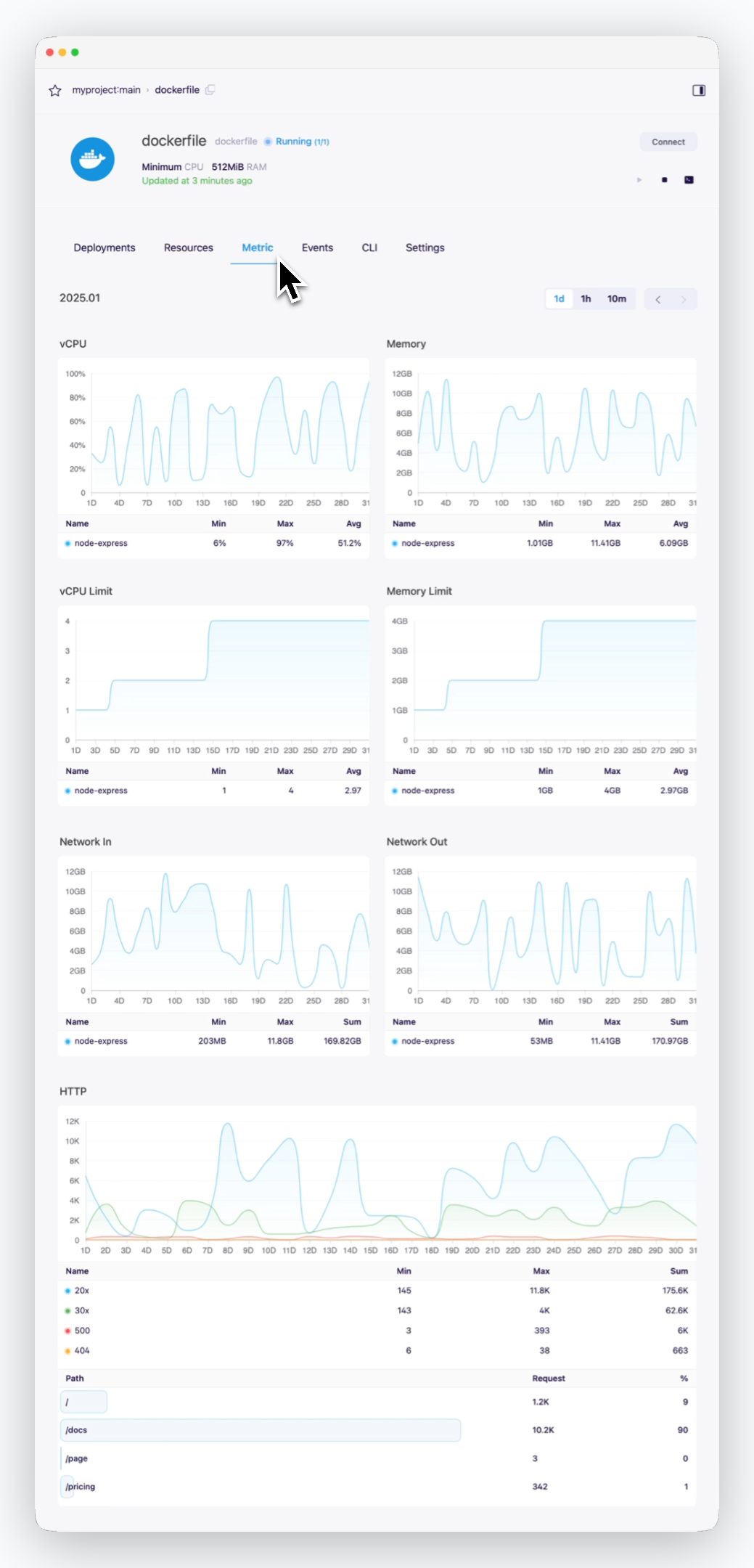 > You can view service metrics in the Metrics tab of the service page.
## Update
> You can view service metrics in the Metrics tab of the service page.
## Update
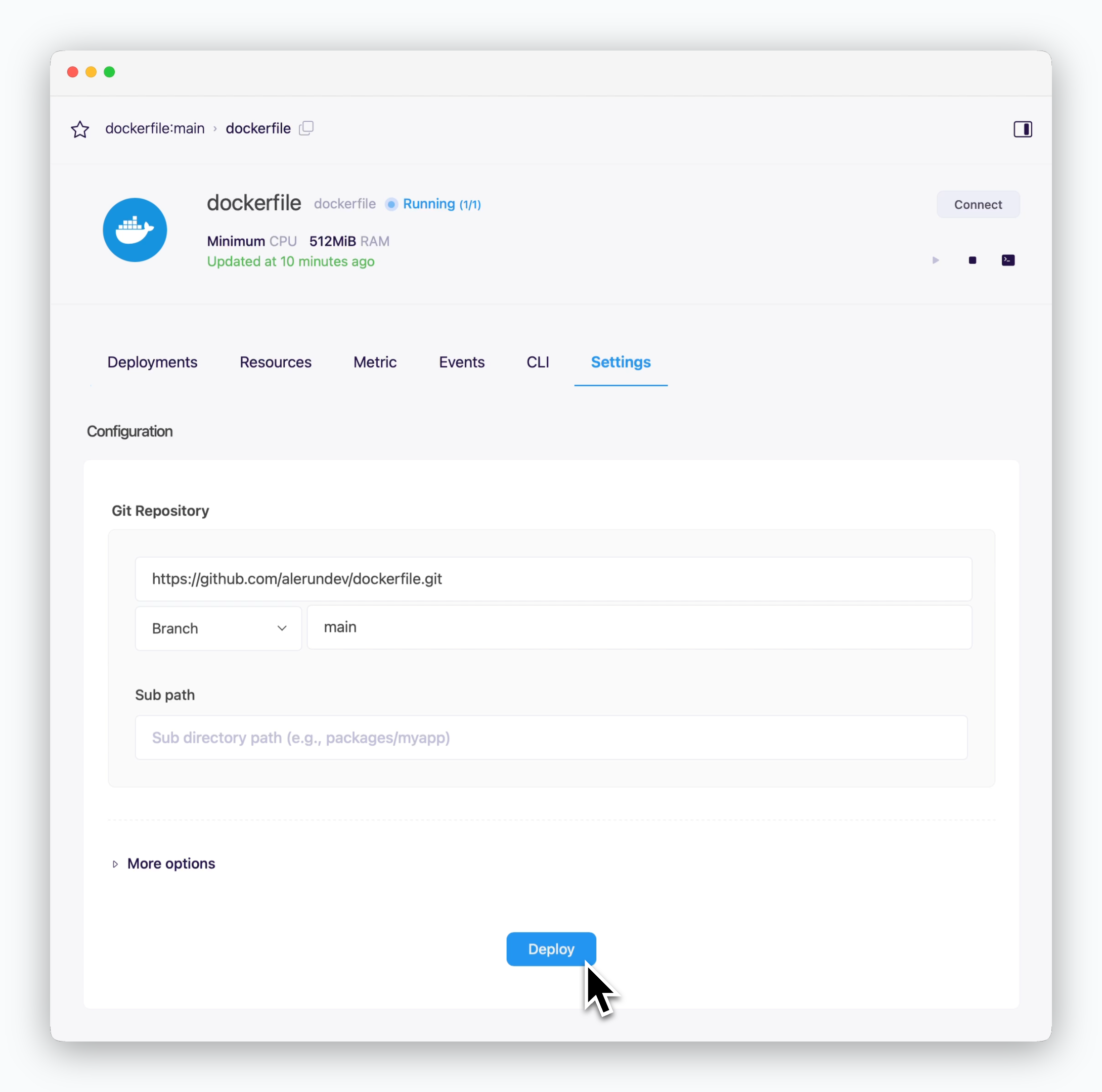 > When you update your code or modify resource settings, click `Deploy` at the bottom of the service settings page to apply these changes with a new deployment.
To set up automated deployments using GitHub Actions, see the [GitHub Actions page](/en/developers/githubactions).
## Rollback
> When you update your code or modify resource settings, click `Deploy` at the bottom of the service settings page to apply these changes with a new deployment.
To set up automated deployments using GitHub Actions, see the [GitHub Actions page](/en/developers/githubactions).
## Rollback
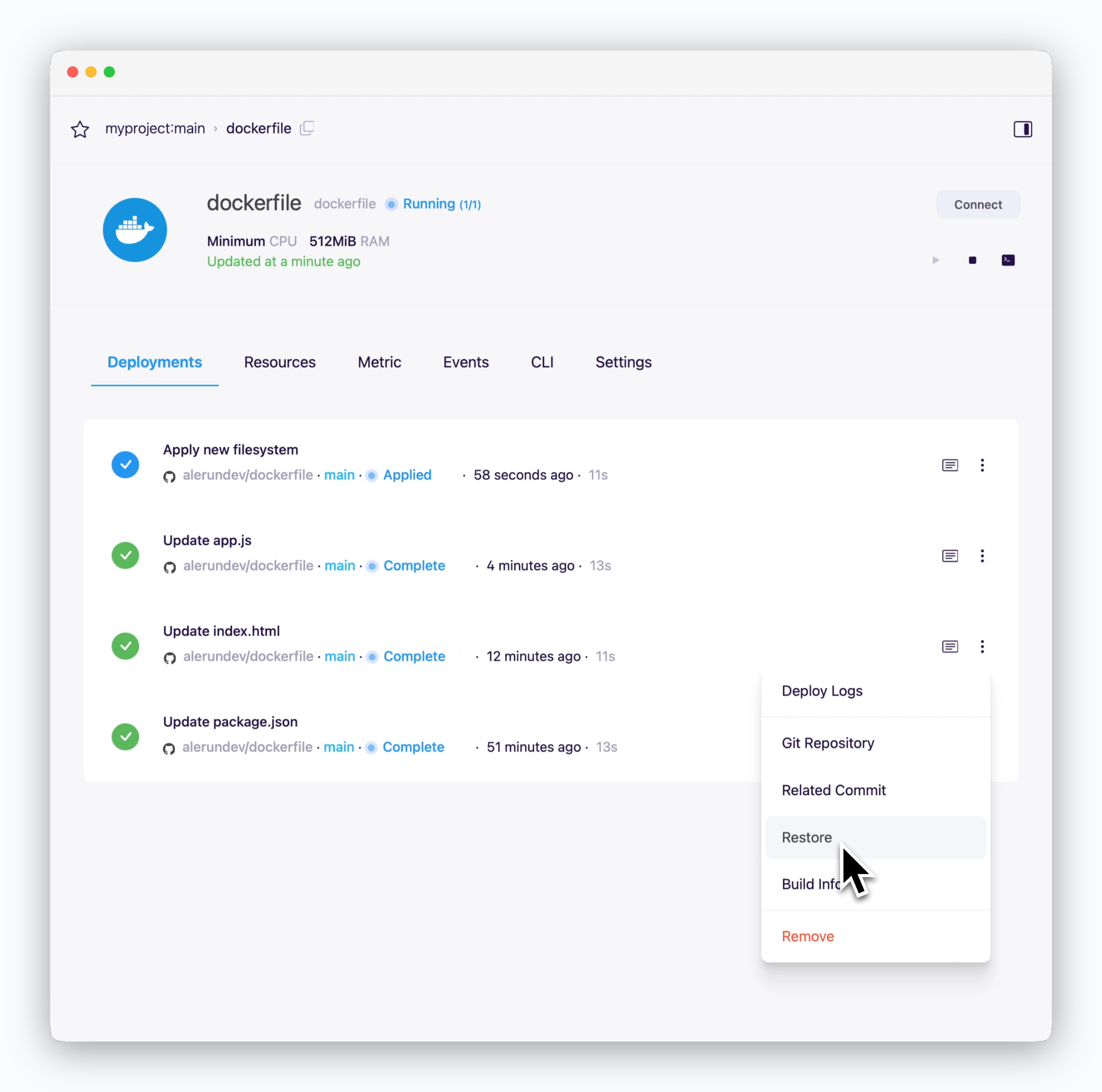 > To restore your service to a previous version, navigate to **the deployment history tab in the service page.**
Check the commit messages in the deployment history to ensure you're rolling back to the intended version.
## Example Code by Language
[Go to Github Repository](https://github.com/cloudtype-examples/docker-node-be)
```dockerfile theme={null}
# Install dependencies
FROM node:16-buster
WORKDIR /app
COPY package*.json ./
RUN npm ci --only=production
ENV NODE_ENV production
COPY . .
# "node" user already exists in node image with uid/gid 1000
USER node
EXPOSE 3000
CMD ["npm", "start"]
```
[Go to Github Repository](https://github.com/cloudtype-examples/docker-node-fe)
```dockerfile theme={null}
# Project build
FROM node:16-buster AS builder
WORKDIR /app
COPY package*.json .
RUN npm ci
COPY . .
RUN npm run build
# Production runtime - nginx
FROM nginxinc/nginx-unprivileged:1.23 AS runner
WORKDIR /usr/share/nginx/html
COPY --from=builder /app/build .
EXPOSE 3000
CMD ["nginx", "-g", "daemon off;"]
```
[Go to Github Repository](https://github.com/cloudtype-examples/docker-python)
```dockerfile theme={null}
FROM python:3.9-slim-buster
ENV PYTHONDONTWRITEBYTECODE=1
ENV PYTHONUNBUFFERED 1
ARG UID=1000
ARG GID=1000
RUN groupadd -g "${GID}" python \
&& useradd --create-home --no-log-init -u "${UID}" -g "${GID}" python
WORKDIR /home/python
COPY --chown=python:python requirements.txt requirements.txt
RUN pip3 install -r requirements.txt
# USER change must be written after pip package installation script
USER python:python
ENV PATH="/home/${USER}/.local/bin:${PATH}"
COPY --chown=python:python . .
ARG FLASK_ENV
ENV FLASK_ENV=${FLASK_ENV}
EXPOSE 5000
# Modify WSGI, port number, module name, etc. according to each source code for deployment
CMD ["gunicorn", "-b", "0.0.0.0:5000", "app:app"]
```
[Go to Github Repository](https://github.com/cloudtype-examples/springboot-crud-example)
```dockerfile theme={null}
# Build executable jar with JDK image
FROM eclipse-temurin:17-alpine AS build
RUN apk add --no-cache bash
WORKDIR /app
COPY gradlew .
COPY gradle gradle
COPY build.gradle settings.gradle ./
# COPY build.gradle.kts settings.gradle.kts ./ Apply .kts extension for Kotlin
RUN ./gradlew dependencies --no-daemon
COPY . .
RUN chmod +x ./gradlew
RUN ./gradlew bootJar --no-daemon
# Apply JRE image to run jar
FROM eclipse-temurin:17-jre-alpine
WORKDIR /app
RUN addgroup -g 1000 worker && \
adduser -u 1000 -G worker -s /bin/sh -D worker
COPY --from=build --chown=worker:worker /app/build/libs/*.jar ./main.jar
USER worker:worker
EXPOSE 8080
ENTRYPOINT ["java", "-jar", "main.jar"]
```
[Go to Github Repository](https://github.com/cloudtype-examples/spring-multi-module)
```dockerfile theme={null}
# Build executable jar with JDK image
FROM eclipse-temurin:17-alpine AS build
RUN apk add --no-cache bash
WORKDIR /app
COPY gradlew .
COPY gradle gradle
COPY build.gradle settings.gradle ./
# COPY build.gradle.kts settings.gradle.kts ./ Apply .kts extension for Kotlin
RUN ./gradlew dependencies --no-daemon
COPY . .
RUN chmod +x ./gradlew
RUN ./gradlew bootJar :api:bootJar --no-daemon
# RUN ./gradlew bootJar ::bootJar --no-daemon
# Apply JRE image to run jar
FROM eclipse-temurin:17-jre-alpine
WORKDIR /app
RUN addgroup -g 1000 worker && \
adduser -u 1000 -G worker -s /bin/sh -D worker
COPY --from=build --chown=worker:worker /app/api/build/libs/*.jar ./main.jar
# COPY --from=build --chown=worker:worker /app//build/libs/*.jar ./main.jar
USER worker:worker
EXPOSE 8080
ENTRYPOINT ["java", "-jar", "main.jar"]
```
[Go to Github Repository](https://github.com/cloudtype-examples/springboot-crud-gradle)
```dockerfile theme={null}
# Build
FROM eclipse-temurin:17-alpine AS build
RUN apk add --no-cache bash
WORKDIR /app
COPY gradlew .
COPY gradle gradle
COPY build.gradle.kts settings.gradle.kts ./
RUN ./gradlew dependencies --no-daemon
COPY . .
RUN chmod +x ./gradlew
RUN ./gradlew build --no-daemon -x test
# Runtime
FROM eclipse-temurin:17-jre-alpine AS runtime
WORKDIR /app
RUN addgroup -g 1000 worker && \
adduser -u 1000 -G worker -s /bin/sh -D worker
COPY --from=build --chown=worker:worker /app/build/libs/*.jar ./main.jar
USER worker:worker
ENV PROFILE=${PROFILE}
EXPOSE 8080
ENTRYPOINT ["java", "-Dspring.profiles.active=${PROFILE}", "-jar", "main.jar"]
```
[Go to Github Repository](https://github.com/cloudtype-examples/springboot-crud-maven)
```dockerfile theme={null}
# Build
FROM eclipse-temurin:17-alpine AS build
RUN apk add --no-cache bash
WORKDIR /app
COPY mvnw .
COPY .mvn .mvn
COPY pom.xml .
RUN ./mvnw dependency:go-offline -B
COPY . .
RUN chmod +x ./mvnw
RUN ./mvnw package -DskipTests
# Runtime
FROM eclipse-temurin:17-jre-alpine as runtime
WORKDIR /app
RUN addgroup -g 1000 worker && \
adduser -u 1000 -G worker -s /bin/sh -D worker
COPY --from=build --chown=worker:worker /app/target/*.jar ./main.jar
USER worker:worker
ENV PROFILE=${PROFILE}
EXPOSE 8080
ENTRYPOINT ["java", "-Dspring.profiles.active=${PROFILE}", "-jar", "main.jar"]
```
> To restore your service to a previous version, navigate to **the deployment history tab in the service page.**
Check the commit messages in the deployment history to ensure you're rolling back to the intended version.
## Example Code by Language
[Go to Github Repository](https://github.com/cloudtype-examples/docker-node-be)
```dockerfile theme={null}
# Install dependencies
FROM node:16-buster
WORKDIR /app
COPY package*.json ./
RUN npm ci --only=production
ENV NODE_ENV production
COPY . .
# "node" user already exists in node image with uid/gid 1000
USER node
EXPOSE 3000
CMD ["npm", "start"]
```
[Go to Github Repository](https://github.com/cloudtype-examples/docker-node-fe)
```dockerfile theme={null}
# Project build
FROM node:16-buster AS builder
WORKDIR /app
COPY package*.json .
RUN npm ci
COPY . .
RUN npm run build
# Production runtime - nginx
FROM nginxinc/nginx-unprivileged:1.23 AS runner
WORKDIR /usr/share/nginx/html
COPY --from=builder /app/build .
EXPOSE 3000
CMD ["nginx", "-g", "daemon off;"]
```
[Go to Github Repository](https://github.com/cloudtype-examples/docker-python)
```dockerfile theme={null}
FROM python:3.9-slim-buster
ENV PYTHONDONTWRITEBYTECODE=1
ENV PYTHONUNBUFFERED 1
ARG UID=1000
ARG GID=1000
RUN groupadd -g "${GID}" python \
&& useradd --create-home --no-log-init -u "${UID}" -g "${GID}" python
WORKDIR /home/python
COPY --chown=python:python requirements.txt requirements.txt
RUN pip3 install -r requirements.txt
# USER change must be written after pip package installation script
USER python:python
ENV PATH="/home/${USER}/.local/bin:${PATH}"
COPY --chown=python:python . .
ARG FLASK_ENV
ENV FLASK_ENV=${FLASK_ENV}
EXPOSE 5000
# Modify WSGI, port number, module name, etc. according to each source code for deployment
CMD ["gunicorn", "-b", "0.0.0.0:5000", "app:app"]
```
[Go to Github Repository](https://github.com/cloudtype-examples/springboot-crud-example)
```dockerfile theme={null}
# Build executable jar with JDK image
FROM eclipse-temurin:17-alpine AS build
RUN apk add --no-cache bash
WORKDIR /app
COPY gradlew .
COPY gradle gradle
COPY build.gradle settings.gradle ./
# COPY build.gradle.kts settings.gradle.kts ./ Apply .kts extension for Kotlin
RUN ./gradlew dependencies --no-daemon
COPY . .
RUN chmod +x ./gradlew
RUN ./gradlew bootJar --no-daemon
# Apply JRE image to run jar
FROM eclipse-temurin:17-jre-alpine
WORKDIR /app
RUN addgroup -g 1000 worker && \
adduser -u 1000 -G worker -s /bin/sh -D worker
COPY --from=build --chown=worker:worker /app/build/libs/*.jar ./main.jar
USER worker:worker
EXPOSE 8080
ENTRYPOINT ["java", "-jar", "main.jar"]
```
[Go to Github Repository](https://github.com/cloudtype-examples/spring-multi-module)
```dockerfile theme={null}
# Build executable jar with JDK image
FROM eclipse-temurin:17-alpine AS build
RUN apk add --no-cache bash
WORKDIR /app
COPY gradlew .
COPY gradle gradle
COPY build.gradle settings.gradle ./
# COPY build.gradle.kts settings.gradle.kts ./ Apply .kts extension for Kotlin
RUN ./gradlew dependencies --no-daemon
COPY . .
RUN chmod +x ./gradlew
RUN ./gradlew bootJar :api:bootJar --no-daemon
# RUN ./gradlew bootJar ::bootJar --no-daemon
# Apply JRE image to run jar
FROM eclipse-temurin:17-jre-alpine
WORKDIR /app
RUN addgroup -g 1000 worker && \
adduser -u 1000 -G worker -s /bin/sh -D worker
COPY --from=build --chown=worker:worker /app/api/build/libs/*.jar ./main.jar
# COPY --from=build --chown=worker:worker /app//build/libs/*.jar ./main.jar
USER worker:worker
EXPOSE 8080
ENTRYPOINT ["java", "-jar", "main.jar"]
```
[Go to Github Repository](https://github.com/cloudtype-examples/springboot-crud-gradle)
```dockerfile theme={null}
# Build
FROM eclipse-temurin:17-alpine AS build
RUN apk add --no-cache bash
WORKDIR /app
COPY gradlew .
COPY gradle gradle
COPY build.gradle.kts settings.gradle.kts ./
RUN ./gradlew dependencies --no-daemon
COPY . .
RUN chmod +x ./gradlew
RUN ./gradlew build --no-daemon -x test
# Runtime
FROM eclipse-temurin:17-jre-alpine AS runtime
WORKDIR /app
RUN addgroup -g 1000 worker && \
adduser -u 1000 -G worker -s /bin/sh -D worker
COPY --from=build --chown=worker:worker /app/build/libs/*.jar ./main.jar
USER worker:worker
ENV PROFILE=${PROFILE}
EXPOSE 8080
ENTRYPOINT ["java", "-Dspring.profiles.active=${PROFILE}", "-jar", "main.jar"]
```
[Go to Github Repository](https://github.com/cloudtype-examples/springboot-crud-maven)
```dockerfile theme={null}
# Build
FROM eclipse-temurin:17-alpine AS build
RUN apk add --no-cache bash
WORKDIR /app
COPY mvnw .
COPY .mvn .mvn
COPY pom.xml .
RUN ./mvnw dependency:go-offline -B
COPY . .
RUN chmod +x ./mvnw
RUN ./mvnw package -DskipTests
# Runtime
FROM eclipse-temurin:17-jre-alpine as runtime
WORKDIR /app
RUN addgroup -g 1000 worker && \
adduser -u 1000 -G worker -s /bin/sh -D worker
COPY --from=build --chown=worker:worker /app/target/*.jar ./main.jar
USER worker:worker
ENV PROFILE=${PROFILE}
EXPOSE 8080
ENTRYPOINT ["java", "-Dspring.profiles.active=${PROFILE}", "-jar", "main.jar"]
```