> ## Documentation Index
> Fetch the complete documentation index at: https://docs.ale.run/llms.txt
> Use this file to discover all available pages before exploring further.
# Storage Configuration
> Guide for configuring AWS EFS or EBS as the default storage class.
***
## AWS EBS
AWS EBS is only accessible from nodes located in the same Availability Zone (AZ) and does not support region-wide disks. If you need storage accessible across all AZs in a region, consider using the [AWS EFS file system](en/setup/eks-eksctl/02_aws-eks-cluster#install-aws-efs-csi-driver).
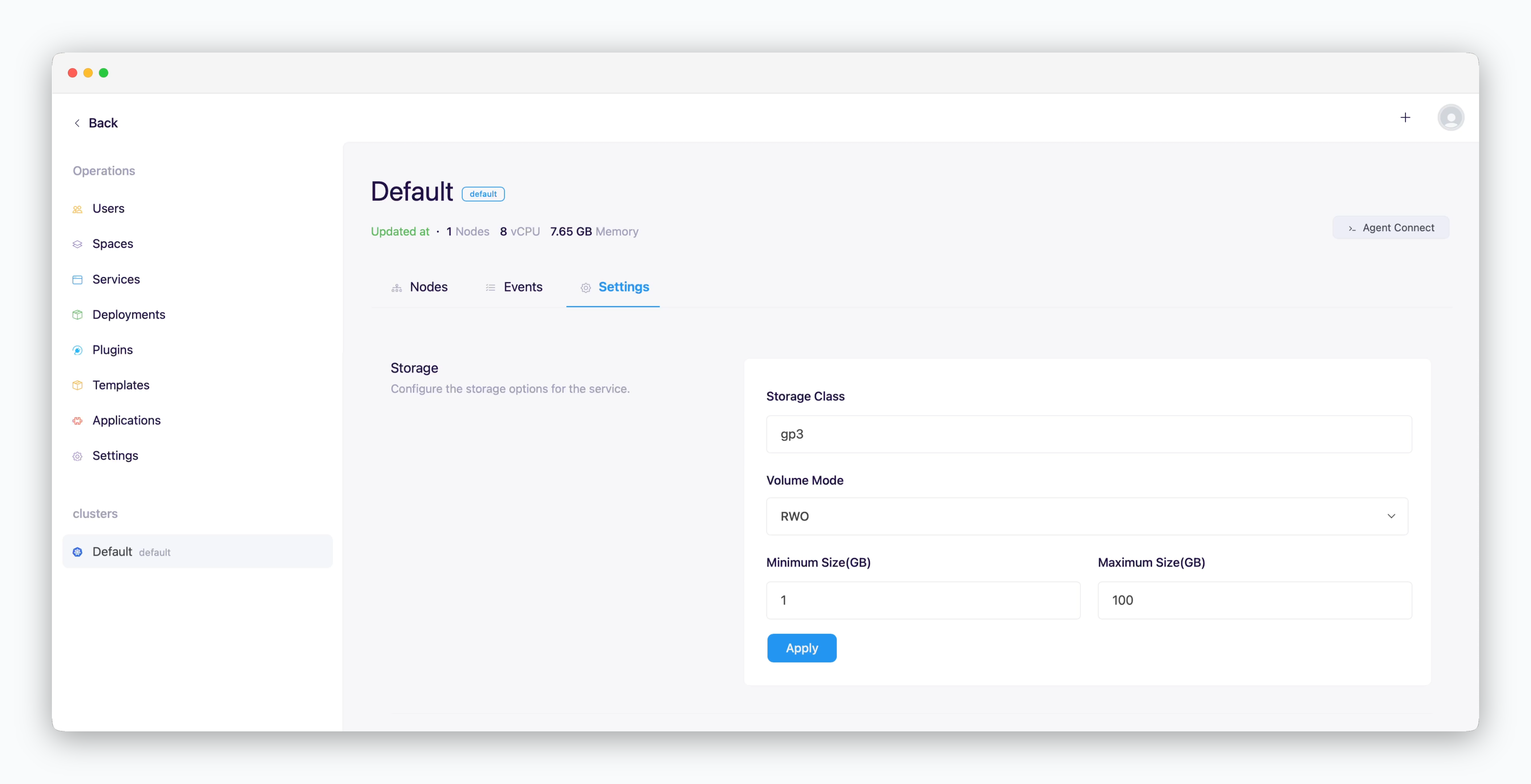 > In the operations system, select your cluster from the sidebar, then go to the **Settings** tab. Scroll down to the **Storage** section, input the following information, and click `Apply`:
* **Storage Class**: gp3
* **Volume Mode**
* RWO (ReadWriteOnce): Single-node volume mount, single pod usage
* RWX (ReadWriteMany): Not supported
* **Minimum/Maximum Size**: Enter in GB
AWS EBS only supports RWO access mode. To utilize RWX storage, consider using [AWS EFS](https://docs.aws.amazon.com/eks/latest/userguide/efs-csi.html), [Rook/Ceph](https://rook.io/docs/rook/latest-release/Storage-Configuration/Block-Storage-RBD/block-storage/#provision-storage), or other NFS solutions.
AWS EBS currently offers two volume types: gp2 and gp3. It is recommended to use **gp3** as the default storage class due to its performance and cost benefits. For more details, refer to [this guide](https://docs.aws.amazon.com/ebs/latest/userguide/general-purpose.html).
* **gp2**
* Throughput: Up to 250MB/s, determined by volume size
* Performance: Burst performance
* **gp3**
* Throughput: Up to 1,000MB/s, independent of volume size
* Performance: Consistent performance
## AWS EFS
> In the operations system, select your cluster from the sidebar, then go to the **Settings** tab. Scroll down to the **Storage** section, input the following information, and click `Apply`:
* **Storage Class**: gp3
* **Volume Mode**
* RWO (ReadWriteOnce): Single-node volume mount, single pod usage
* RWX (ReadWriteMany): Not supported
* **Minimum/Maximum Size**: Enter in GB
AWS EBS only supports RWO access mode. To utilize RWX storage, consider using [AWS EFS](https://docs.aws.amazon.com/eks/latest/userguide/efs-csi.html), [Rook/Ceph](https://rook.io/docs/rook/latest-release/Storage-Configuration/Block-Storage-RBD/block-storage/#provision-storage), or other NFS solutions.
AWS EBS currently offers two volume types: gp2 and gp3. It is recommended to use **gp3** as the default storage class due to its performance and cost benefits. For more details, refer to [this guide](https://docs.aws.amazon.com/ebs/latest/userguide/general-purpose.html).
* **gp2**
* Throughput: Up to 250MB/s, determined by volume size
* Performance: Burst performance
* **gp3**
* Throughput: Up to 1,000MB/s, independent of volume size
* Performance: Consistent performance
## AWS EFS
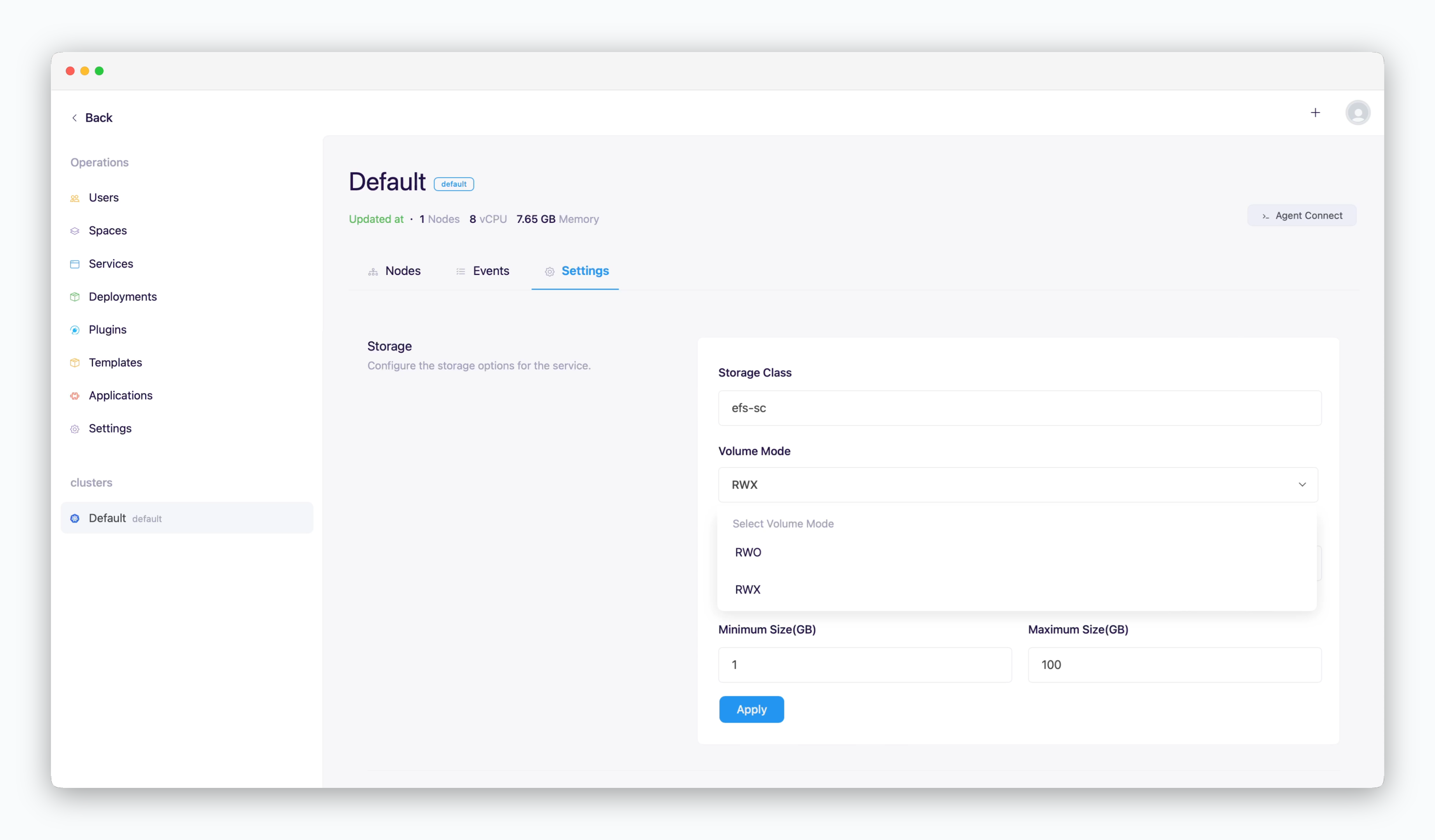 > In the operations system, select your cluster from the sidebar, then go to the **Settings** tab. Scroll down to the **Storage** section, input the following information, and click `Apply`:
* **Storage Class**: efs-sc
* **Volume Mode**
* RWO (ReadWriteOnce): Single-node volume mount, single pod usage
* RWX (ReadWriteMany): Multi-node volume mount, multi-pod usage
* **Minimum/Maximum Size**: Enter in GB
> In the operations system, select your cluster from the sidebar, then go to the **Settings** tab. Scroll down to the **Storage** section, input the following information, and click `Apply`:
* **Storage Class**: efs-sc
* **Volume Mode**
* RWO (ReadWriteOnce): Single-node volume mount, single pod usage
* RWX (ReadWriteMany): Multi-node volume mount, multi-pod usage
* **Minimum/Maximum Size**: Enter in GB