> ## Documentation Index
> Fetch the complete documentation index at: https://docs.ale.run/llms.txt
> Use this file to discover all available pages before exploring further.
# Cloudflareドメイン登録
> ドメインをダッシュボードやアプリケーションプレビュー用に設定するガイドです。
事前にCloudflareでドメインを購入し、ガイドの内容に従って設定してください。
***
## Nginx Ingress ControllerのIP確認
> ネームサーバーにレコードを作成するため、Nginx Ingress ControllerのIPを確認します。
```bash theme={null}
kubectl get svc \
-n ingress-nginx \
ingress-nginx-controller \
-o jsonpath='{.status.loadBalancer.ingress[0].ip}' \
| xargs -I{} echo "{}"
```
## Cloudflareでレコードを作成
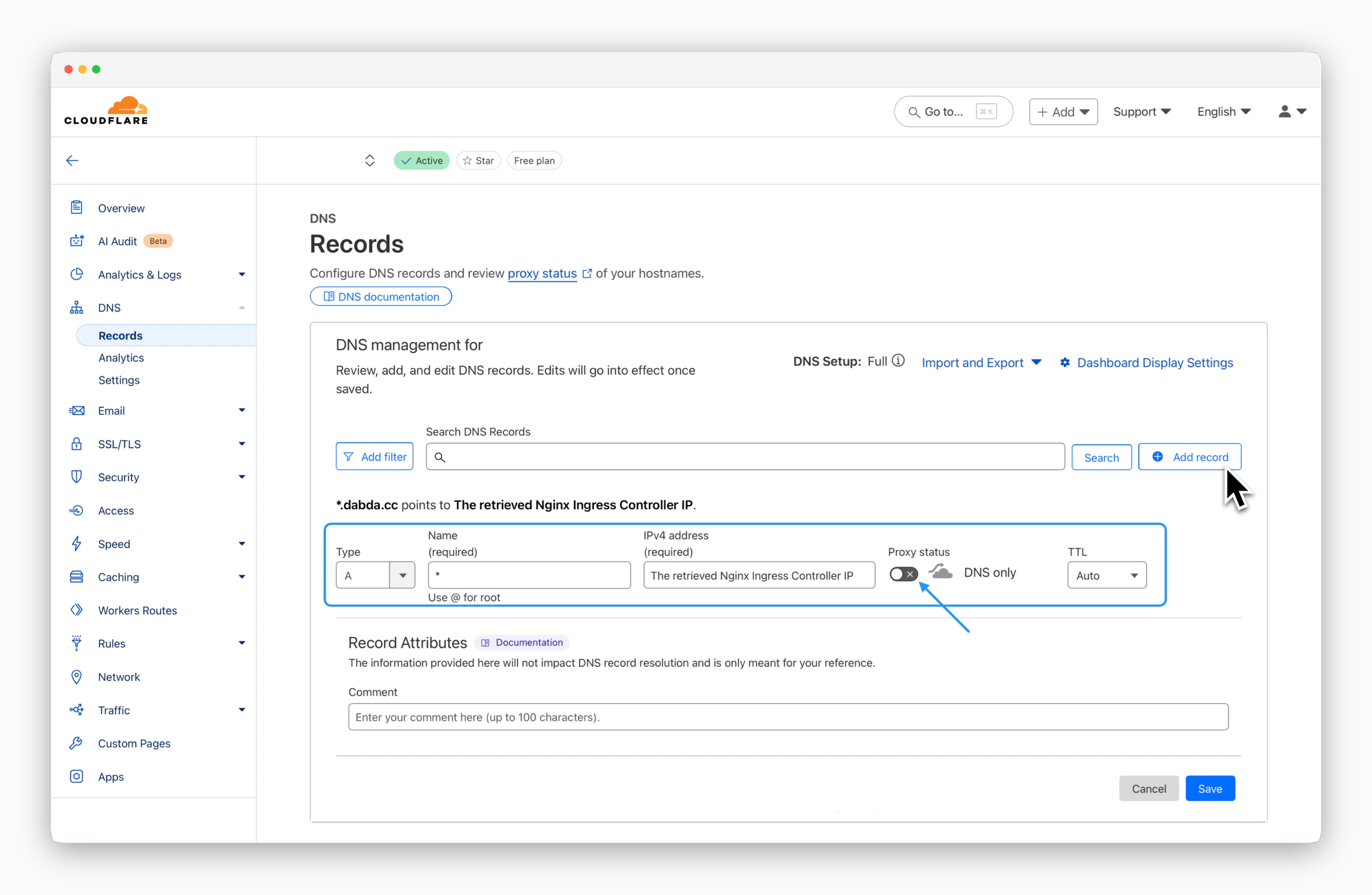 > `DNS > Records`ページで`Add record`をクリックし、以下の値を入力して`Save`します。
* **レコード名**: \*
* **レコードタイプ**: A
* **値**: 確認したNginx Ingress ControllerのIP
* **プロキシ状態**: 無効(オフ)
以下のコマンドを使用して、レコードが正常に反映されているか確認できます。
```bash theme={null}
dig "<レコードとして登録したドメイン>"
```
> `DNS > Records`ページで`Add record`をクリックし、以下の値を入力して`Save`します。
* **レコード名**: \*
* **レコードタイプ**: A
* **値**: 確認したNginx Ingress ControllerのIP
* **プロキシ状態**: 無効(オフ)
以下のコマンドを使用して、レコードが正常に反映されているか確認できます。
```bash theme={null}
dig "<レコードとして登録したドメイン>"
```