> ## Documentation Index
> Fetch the complete documentation index at: https://docs.ale.run/llms.txt
> Use this file to discover all available pages before exploring further.
# 리버스 프록시
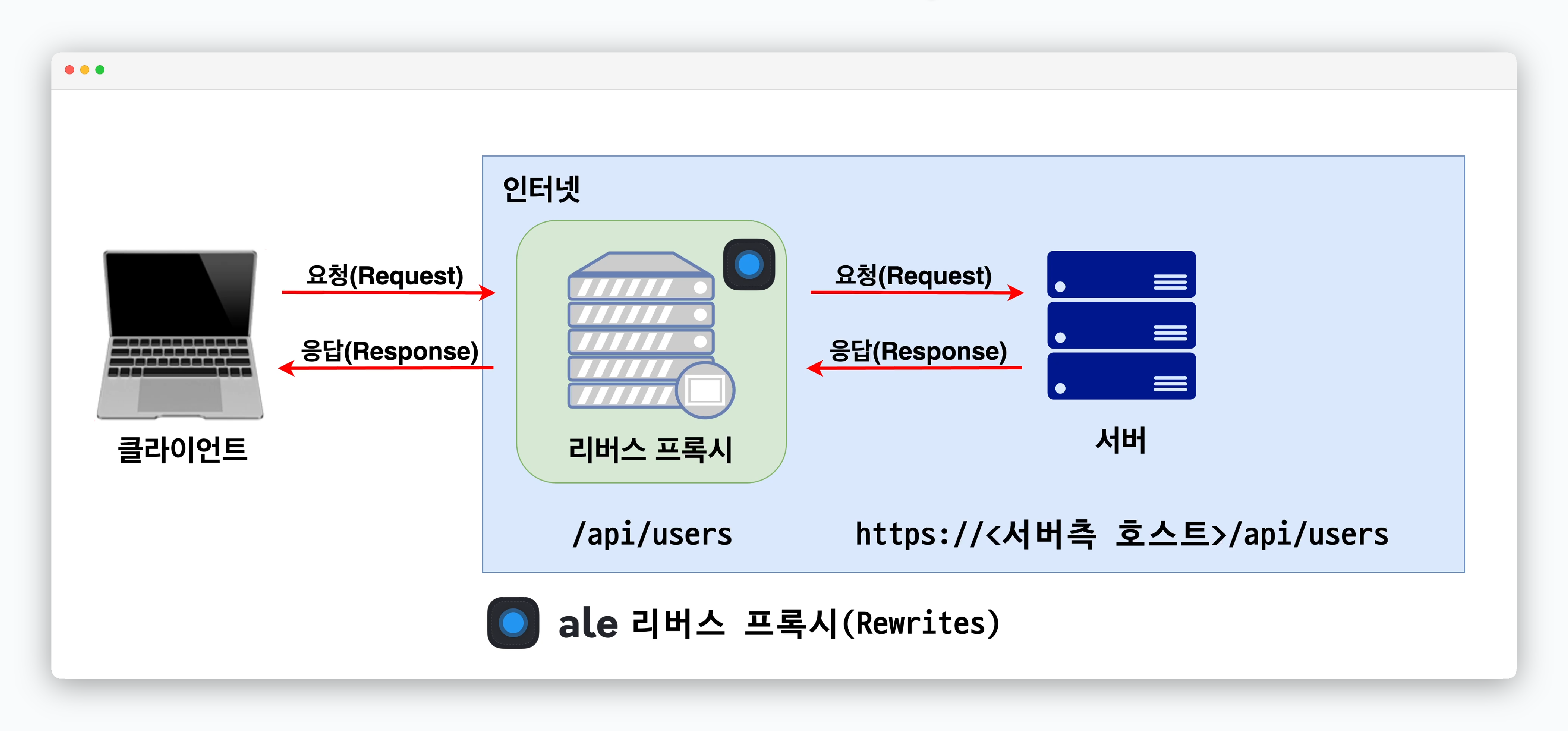 > `ale` 은 별도의 Nginx 서버 세팅없이, 위와 같은 리버스 프록시가 작동하도록 하는 기능을 지원하며, React 등 Web Application을 프리셋으로 사용하는 서비스에 간편하게 적용할 수 있습니다.
***
## 준비 사항
> 리버스 프록시 기능을 적용하려는 React등의 프론트엔드 서비스의 코드 중 외부의 **API URL을 호출하는 부분을 자기 자신을 호출하도록 작성**해야 합니다. 이 부분은 배포과정에서 `Rewrite` 필드값 입력을 통해 리버스 프록시로 처리됩니다.
## 리버스 프록시 적용(Rewrites)
> `ale` 은 별도의 Nginx 서버 세팅없이, 위와 같은 리버스 프록시가 작동하도록 하는 기능을 지원하며, React 등 Web Application을 프리셋으로 사용하는 서비스에 간편하게 적용할 수 있습니다.
***
## 준비 사항
> 리버스 프록시 기능을 적용하려는 React등의 프론트엔드 서비스의 코드 중 외부의 **API URL을 호출하는 부분을 자기 자신을 호출하도록 작성**해야 합니다. 이 부분은 배포과정에서 `Rewrite` 필드값 입력을 통해 리버스 프록시로 처리됩니다.
## 리버스 프록시 적용(Rewrites)
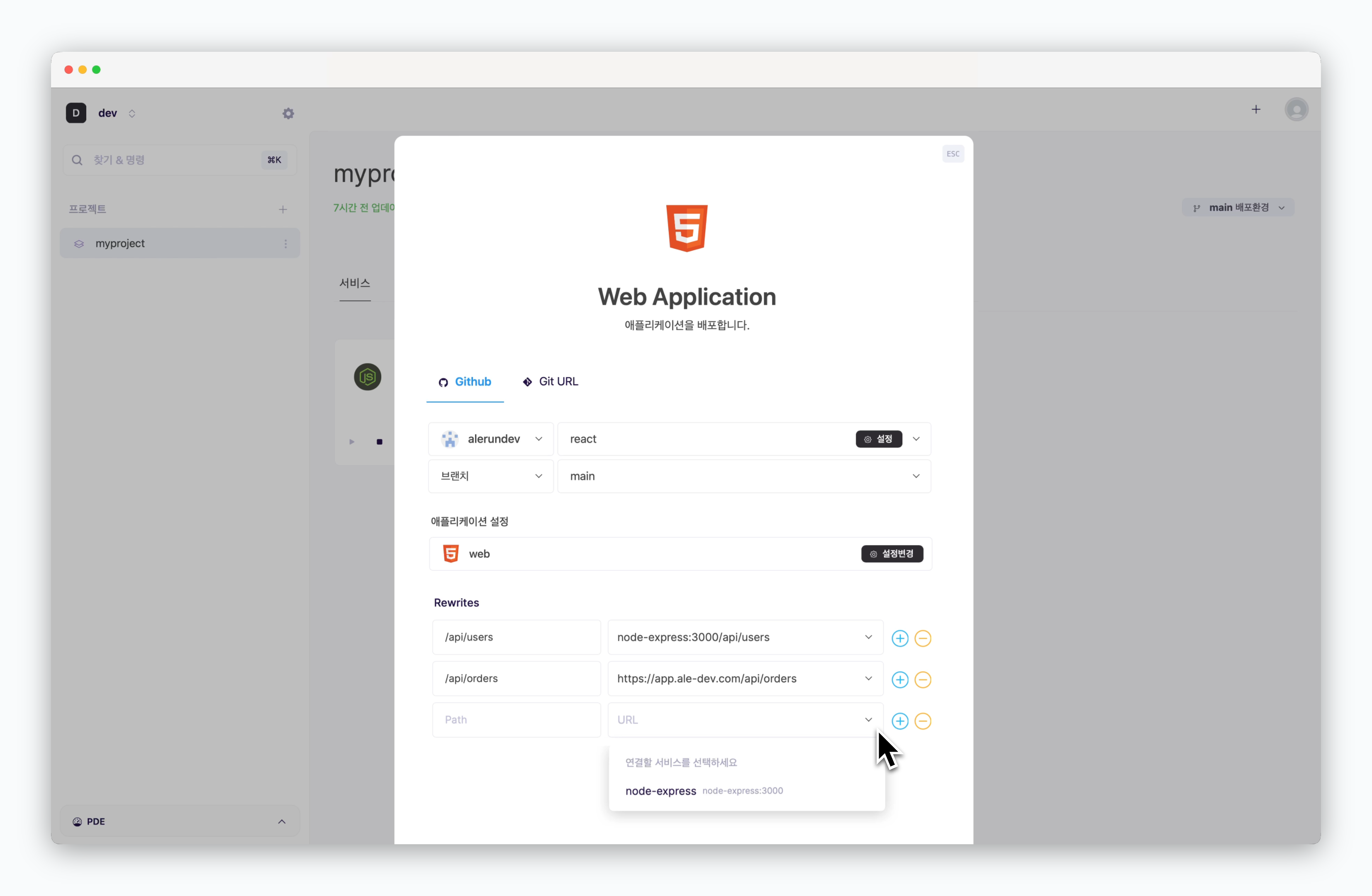 > React 등 Web application을 프리셋으로 사용하는 프론트엔드 서비스의 배포 설정화면에 **Rewrites** 필드를 아래와 같은 규칙으로 입력해 리버스 프록시를 적용할 수 있습니다.
* **좌측 필드** : 코드에 작성된 호출 경로
* **우측 필드** : 실제로 호출해야 할 경로
드롭다운 메뉴에서 동일화면(배포환경)에 있는 서비스를 선택하고 경로를 추가하거나, URL을 직접 입력할 수 있습니다.
> React 등 Web application을 프리셋으로 사용하는 프론트엔드 서비스의 배포 설정화면에 **Rewrites** 필드를 아래와 같은 규칙으로 입력해 리버스 프록시를 적용할 수 있습니다.
* **좌측 필드** : 코드에 작성된 호출 경로
* **우측 필드** : 실제로 호출해야 할 경로
드롭다운 메뉴에서 동일화면(배포환경)에 있는 서비스를 선택하고 경로를 추가하거나, URL을 직접 입력할 수 있습니다.